
 |
| Windows 11 new build KB5041881- (image source: uwinpc.com) |
Apart from all this, Microsoft released a new update KB5041582 for Windows 10. You will see many fixes in it.
Many improvements will be seen in this update of Windows 11 KB5041881. In which you have included many updates like Spotlight and File Explorer.
Windows 11 New Insider Build KB5041881 Fixes
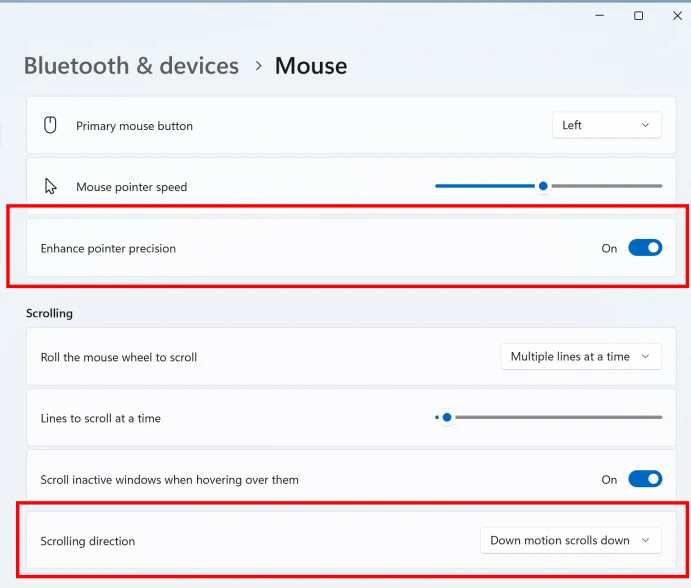
First of all, in this update, if you are working on Enterprise, Education, or Pro of Windows 11, then you will see a new icon on the taskbar. Now you will get quick access to Copilot for something called Microsoft 365.Now you can use mouse scrolling and turn off the enhanced mouse pointer. With its help, you can change the direction of scrolling.
In this new update for touchscreen users, you can accidentally try to trigger something by touching the edges of the screen. If you are finding it painful to move left or right, then you can disable it.
Microsoft is testing something new called Desktop Spotlight. In which you are like having a miniature art gallery on the desktop. Creating some new ways to interact with these beautiful background images.
In which you will see small "hotspots". If you click on these images, you will get more information related to the image.

Windows Share, If you share stuff directly from Windows to Notepad and Clipchamp (a video editor), it will be easy. Because it will be shared with a few clicks.
Apart from all these, some fixes have been found, you will get improvements in Windows Hello for Business PIN reset, symbolic links, Unified Write Filter and problems with Microsoft System Center Configuration Manager.
Finally, this is related to the European Digital Markets Act on Windows 11. And BitLocker for encrypting the drive (it is like a high-tech padlock for your data) in which now improvements will be seen.
Such changes are included. What is your opinion on this new Windows 11 beta update 22635.4145 (KB5041881)? Leave your comments!
KB5041881 Update Other Bugs
Bugs, Microsoft was coming out with Windows 11. Some bugs were in File Explorer. If you tried to see some folders or files, it would crash. They have fixed the problem of the Start Menu text becoming unreadable and the Bluetooth device disconnecting.Apart from all these, some fixes have been found, you will get improvements in Windows Hello for Business PIN reset, symbolic links, Unified Write Filter and problems with Microsoft System Center Configuration Manager.
Finally, this is related to the European Digital Markets Act on Windows 11. And BitLocker for encrypting the drive (it is like a high-tech padlock for your data) in which now improvements will be seen.
Such changes are included. What is your opinion on this new Windows 11 beta update 22635.4145 (KB5041881)? Leave your comments!